OAuth 2.0 / OpenID Connect
Looking for a plainer explanation of clients/scopes/redirect URIs instead of endpoint-level detail? See Connecting Apps (Single Sign-On).
SSO Manager is an OpenID Connect / OAuth 2.0 provider: it issues its own access, refresh, and ID tokens that your apps can consume to authenticate users and authorize API calls. It also runs a full OpenLDAP directory, so it can be both your SSO and your user directory at once.
Discovery
The provider publishes a standards-compliant discovery document:
GET https://<sso-host>/.well-known/openid-configuration
It advertises the issuer, authorization_endpoint, token_endpoint,
userinfo_endpoint, end_session_endpoint, supported scopes, and token
lifetimes. OIDC clients (e.g. the theta42/proxy) can read their endpoint URLs
from here rather than configuring each one.
The issuer advertised is conf.oauth.issuer — set it to the browser-facing
HTTPS URL the SSO is served at (e.g. https://sso.example.com), either in
conf/secrets.js or via app_oauth__issuer / OAUTH_ISSUER.
OAuth clients
An OAuth client represents an app that authenticates against the SSO. Each has:
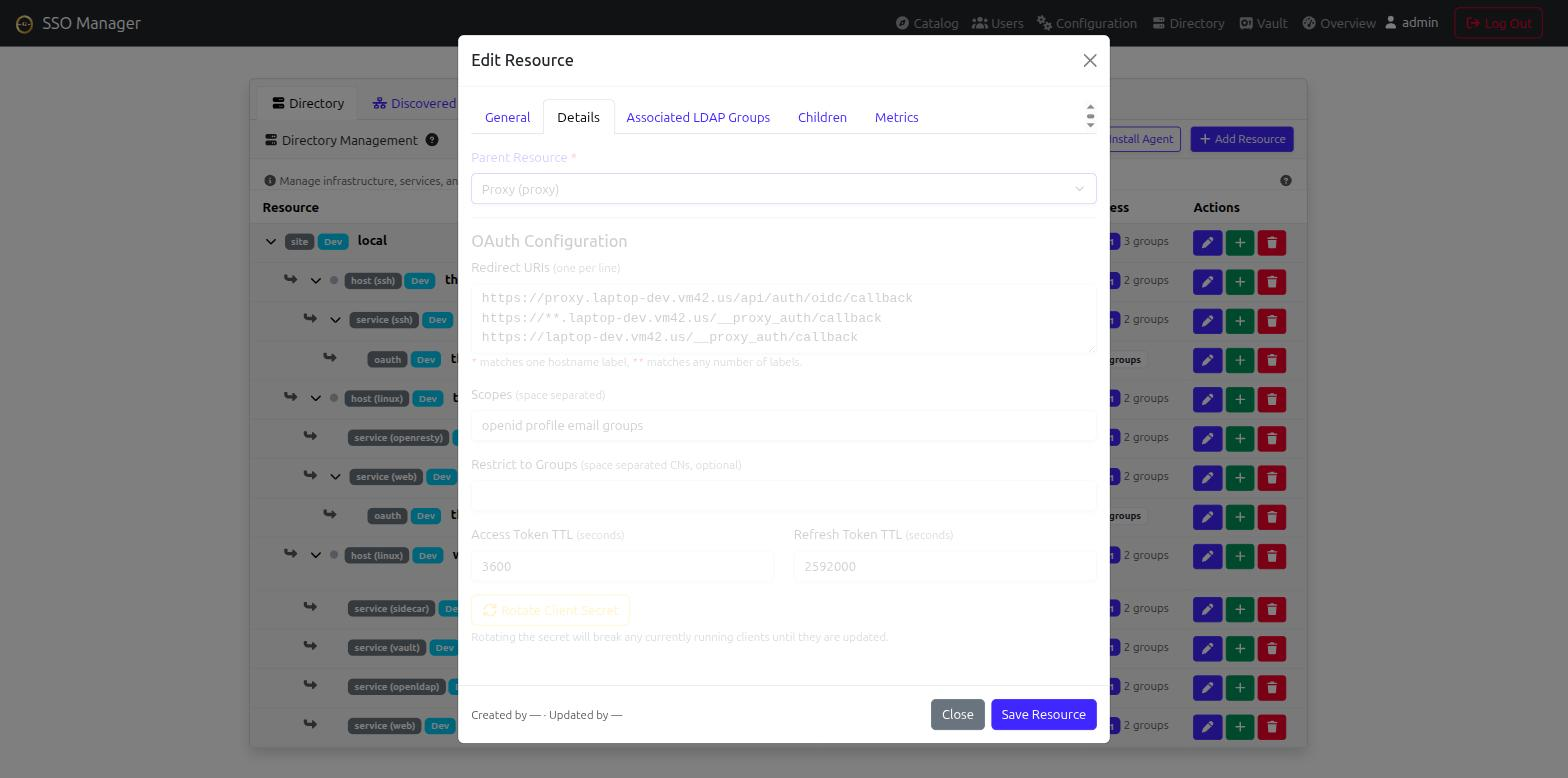
client_id(UUID) +client_secret(bcrypt-hashed; the raw secret is shown once when the client is created or rotated — save it immediately).name,description,created_by(the admin uid that created it).redirect_uris— allowed callback URLs. Each entry matches exactly, or may use*(one hostname label) /**(any number of labels) as a wildcard — e.g.https://*.example.com/__proxy_auth/callbackcovers every host theta42/proxy fronts underexample.com, so you don’t have to register each proxied host’s callback individually.scopes— requested scopes (defaultopenid profile email groups).allowed_groups— restrict the client to members of specific SSO groups (empty = any valid user).token_lifetime—access_token/refresh_tokenlifetimes (seconds).
Managing clients
Clients are managed directly from the Directory tab in the web UI. They are modeled as resources of kind: oauth and must belong to a parent Service.
| Action | How to do it |
|---|---|
| Create | Click the green + on a parent Service to add a child resource. Choose OAuth Integration. The raw client_secret is shown once upon creation. |
| Edit | Click the edit pencil on the OAuth resource in the Directory list or tree. You can update redirect URIs, scopes, allowed groups, and token TTLs. |
| Delete | Click the trash can on the OAuth resource in the Directory list. |
| Rotate Secret | Open the edit modal for the OAuth resource and click Rotate Client Secret. The new raw secret is shown once. |
All client-management actions use the standard Directory API (
/api/directory-admin/resources) and are gated by theapp_sso_directory_admingroup.
Scopes
| Scope | Claims / access |
|---|---|
openid |
OIDC ID token + discovery |
profile |
preferred_username, display name, etc. |
email |
the user’s mail |
groups |
the user’s group memberships (the groups claim) |
The groups claim is what relying parties (e.g. the proxy’s
app_auth__adminGroups) use to map group membership to roles.
Token lifetimes
Defaults (overridable per-client via token_lifetime, or globally via
app_oauth__token_lifetime__access_token /
app_oauth__token_lifetime__refresh_token):
- access token: 3600s (1 hour)
- refresh token: 2592000s (30 days)
Admin gating
SSO admin actions are gated by LDAP group membership (checked via the group’s
member list, not memberOf on the user):
app_sso_admin— full admin (users, groups, settings).app_sso_oauth_admin— OAuth client management.app_sso_invite— invitation management.
The bootstrap in theta-env creates your
first admin and adds them to app_sso_admin + app_sso_oauth_admin
automatically; for a standalone install, add the admin’s DN to those groups
manually (or via ops/ldap-setup.sh).
JWT signing
Tokens are signed with conf.oauth.jwtSecret (app_oauth__jwtSecret /
JWT_SECRET). Persist this secret — if it changes, every issued token
stops validating. The all-in-one Docker image auto-generates one if none is set,
but that generated value does not survive container recreation unless you
persist it (set JWT_SECRET in your .env).