Directory Management
Theta Directory ships with a built-in Directory & Inventory Management feature. Instead of just managing bare LDAP groups for your homelab, the Directory allows you to map out your infrastructure graph and assign rich metadata to your services.
Architecture
The Directory models your homelab infrastructure using a parent-child graph (e.g. Site -> Host -> Service).
There are three primary Kinds of resources you can define:
- Site: A physical location, datacenter, or root node (e.g.,
us-east). Sites do not require parents. - Host: A physical machine, Proxmox node, virtual machine, or LXC container. A Host must have a parent Site or another Host.
- Service (App): An application, web service. A Service must have a parent Host or another Service.
- OAuth Integration: An OAuth 2.0 / OpenID Connect client application. An OAuth integration must have a parent Service.
By defining this hierarchy, Theta Directory builds a queryable graph of your infrastructure.
Automatic LDAP Group Creation
When you create a new Host or Service in the Directory via the web UI (or API), Theta Directory will automatically provision two LDAP groups in your directory to govern access to that resource:
<slug>_access(Member level access)<slug>_admin(Owner level access)
For example, if you create a Service named “Emby” with the slug app_emby, the system will create the LDAP groups app_emby_access and app_emby_admin. You can then assign users to these groups, and they will immediately see the service populate on their “My Services” dashboard.
Two exceptions, by design
A service registered by theta-agent gets no groups of its own. When you run
theta-agent register systemd emby-server on a host, the Directory creates a
service resource under that host — but a systemd unit is not an access
boundary. Whoever administers the machine administers its units. One
svc-<host>-systemd-<unit>_access pair per unit per host is sprawl with no
decision behind it, so these resources inherit access from the host that runs
them instead, and the Directory hides the Associated LDAP Groups tab for
them. Their Access column reads via host.
This applies only to services an agent registered. A service resource you
created by hand — the stack’s own sso-manager-<site>, an OAuth-linked app —
is something you chose to model, and keeps its groups.
A host running theta-agent is reachable without a per-host grant, for users
whose groups already cover hosts at that site (god_admin,
{site}_super_admin, or the {site}_hosts_access / {site}_hosts_admin
aggregate — see GROUPS). Installing the agent requires root on
the machine and a join key from this Directory, so it is already under
management. The <slug>_access / <slug>_admin groups are still created and
still work for granting access to anyone else.
Access does not outlive the enrolment: revoking or deleting an agent clears the binding and removes the host from every access projection immediately.
Resource Metadata
Resources carry a flexible metadata JSON object that can store essential context for your applications. The UI natively supports the following metadata fields:
Common Metadata
- Sub Type: Free-form text to categorize the resource (e.g.,
proxmox_node,linux,lxc,web). - IP Address: The internal IP address of the resource.
- MAC Address: The hardware address of the primary interface.
- Host / URI Address: The FQDN or URL of the resource (e.g.,
https://emby.home.arpa). - Production Environment: A boolean toggle indicating if the resource is in production.
Host Metadata
- VMID: The hypervisor VM or Container ID (e.g.
101). - OS: The operating system name (e.g.
Ubuntu 22.04.3 LTS). - Kernel: The kernel version string (e.g.
5.15.0-100-generic).
Service Metadata
- Internal Port: The local port the service binds to (e.g.
8080). - External Port: The reverse-proxy or external port (defaults to Internal Port if left blank).
- Public (No Auth): Indicates if the service is exposed publicly without authentication.
- External Reachable: Indicates if the service is accessible outside the VPN/local network.
- Git Repo: The source code repository for the service (e.g.
https://github.com/...). - Install Path: The filesystem path where the service is installed (e.g.
/opt/app). - Systemd Service: The systemd unit name for the service (e.g.
app.service).
Who sees which metadata
Metadata keys are declared in @simpleworkjs/directory-schema with an admin flag, and every API response is passed through its projection. There are three tiers:
- Public — returned to any authenticated caller, including machine (
ServiceToken) callers:ip,address,sshPort,fqdn,dnsNames,port,externalPort,portMappings,isExternalReachable,os,gitRepo,subType,icon,tagline,isPublic,isProduction,requestable,isCurrentSite. - Admin-only — only for members of
app_sso_directory_admin/app_sso_admin:vmid,macAddress,installPath,systemdService, and the OAuth config keys (redirect_uris,scopes,allowed_groups,token_lifetime). - Never returned —
client_secret_hash, plus any key matching/secret|password|privatekey/i. Stripped on every path, admins included.
Note that machine tokens are deliberately not admins, so anything a machine consumer needs (the firewall generator reads port / externalPort / isExternalReachable) has to be in the public tier. A metadata key that isn’t declared at all is treated as admin-only and will silently vanish for normal users — if you add a field to the admin form, declare it in the schema package too.
Catalog & access requests
The site root (/) is the end-user catalog — the only ungated page in the nav. It shows:
- My Access — everything the signed-in user can reach (
GET /api/discovery/me), each card carrying a how to reach it block: the URL for a service, or the SSH invocation for a host. Whendirectory.jumpHostis set in the config, host cards render the jump-host formssh <uid>_-_<slug>@<jumpHost>; otherwise they fall back to a directssh <uid>@<ip>. - Discover More — everything else in the directory, with a Request access button.
- My Requests / Awaiting My Approval — pending requests, and the approve/deny queue for anyone who owns a requested resource.
A request is a proposal to join an LDAP group. It targets the resource’s member-level group (the _access one, never _admin), and approving it performs the LDAP group add — so LDAP stays the single access-control truth and the table is just the audit trail. Approvals are idempotent: approving for someone already in the group succeeds rather than erroring.
Requests are decided by the resource’s owner, or by any directory admin. Mark a resource metadata.requestable = false to keep it out of self-service.
Navigating the UI
The Directory Management interface provides a Tree View toggle that visually nests your resources, making it easy to comprehend your network topography at a glance. You can also filter, search, and sort your entire infrastructure inventory. From the tree view, you can click the green + icon next to any resource to instantly add a child resource beneath it.
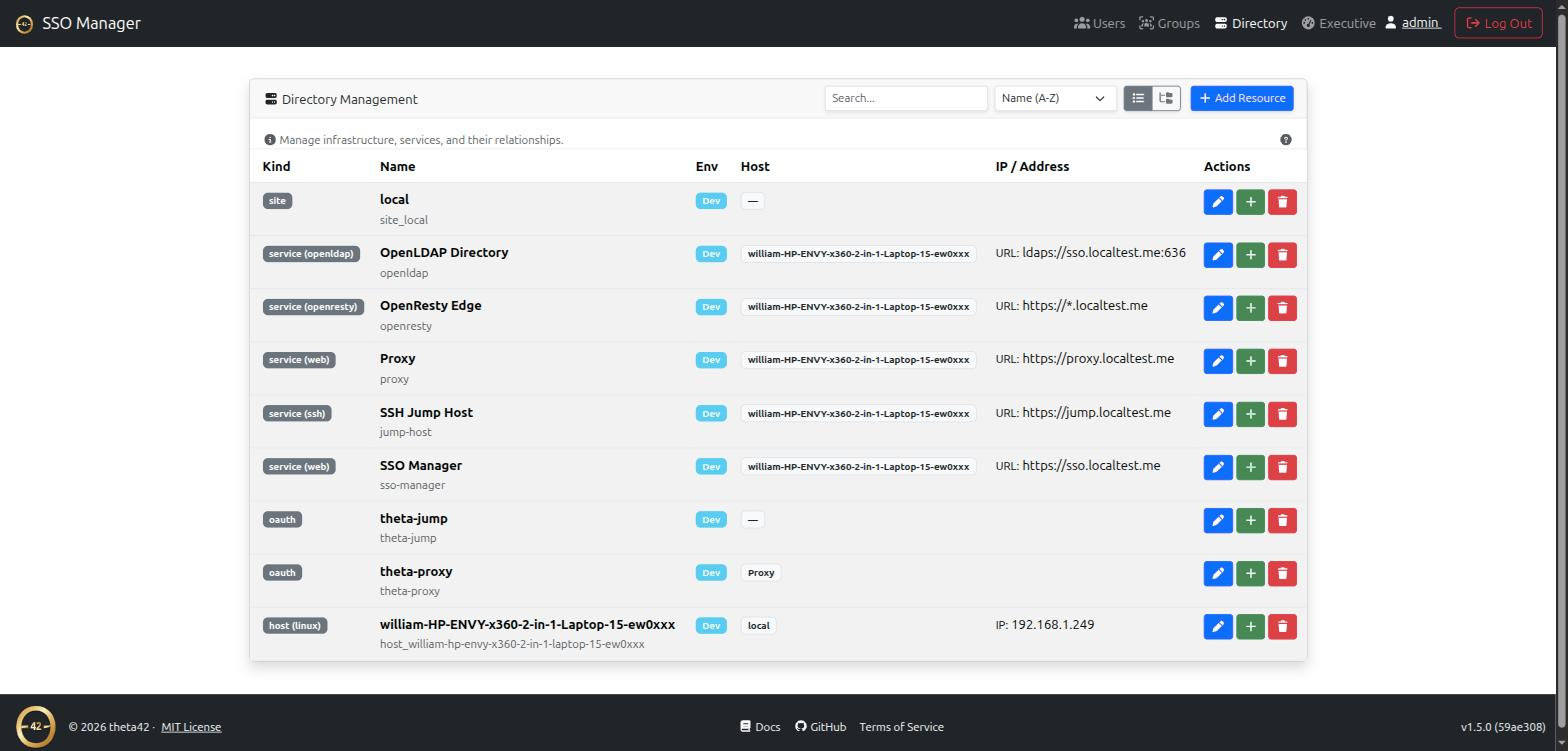
Live status and control
Hosts carry a coloured dot in the tree for their agent (green healthy, amber high load, red enrolled-but-offline, grey no agent). Services registered by an agent carry the same dot for the service itself: green active, red inactive, grey when the host agent is offline or has not reported the service yet, and a darker grey when the unit is no longer present on the host at all. A service’s state is only as current as the agent reporting it, so an offline agent greys the service out rather than leaving a stale green.
Opening a registered service shows Live status & metrics — sub-state, CPU,
memory, restart count, uptime, and for timers and cron entries the next/last run
— plus Start / Restart / Stop (and Reload for systemd units). The
buttons dispatch over the agent’s signed command channel; stop and restart
are confirmed first and marked high-risk, start is not. They are disabled with
the reason in the tooltip when the agent is not connected, rather than appearing
and vanishing as it reconnects.
Only subtypes with a real lifecycle are offered controls: systemd, docker,
podman, openrc. A timer, a cron entry or a VM has no systemctl start, so
no button is shown rather than one that can only fail.
Slug conventions
Slugs are the stable identifiers automation keys off, so the tooling around Theta Directory follows a shared convention:
- Sites:
site_<name>— e.g.site_local,site_us-east - Hosts:
host_<hostname>— e.g.host_pve1,host_web01 - Services/apps: a plain slug or
app_<name>— e.g.sso-manager,app_emby
The auto-created LDAP groups derive from the slug (<slug>_access / <slug>_admin), so keep slugs stable once access groups are in use.
Automatic registration
You don’t have to build the graph by hand — the theta42 tooling registers itself:
The stack itself (theta-env)
theta-env’s ./setup.sh seeds the directory on every run with the stack it deploys:
- a site (name from
CFG_SITE_NAMEinmaster.env, defaultlocal→ slugsite_local) marked as the current site - the host the stack runs on (
host_<hostname>), with IP, MAC address, OS, and kernel collected from the machine - the services it composes — Theta Directory, Proxy (management UI), OpenLDAP Directory (the LDAPS endpoint Linux hosts and LDAP-native apps bind to), and OpenResty Edge (the 80/443 data plane) — each with its address, internal port, and git repo
- the proxy’s auto-registered OAuth client, linked under its service
The seed is idempotent and non-destructive: a resource whose slug already exists is considered operator-owned — the seed only fills in metadata fields you haven’t set, and never overwrites your values.
Linux hosts (ldap-client)
The ldap-client join script enrolls a Debian/Ubuntu machine for LDAP login (SSSD/PAM), LDAP-backed sudo, and SSH keys from the directory — and, when given an SSO API token, registers the machine as a host_<hostname> resource with its IP, MAC, OS, and kernel, parented to the site named by its configured location.
Consumers of the directory
The inventory graph isn’t just documentation — other components read it to make decisions:
- Jump Host — an SSH jump host that resolves which downstream machines a user may reach from their LDAP groups × the directory’s
hostresources (GET /api/discovery/resources?group=<cn>), then bridges them in. Thehost_<hostname>slugs andhost_<slug>_accessgroups this directory creates are exactly what it keys off; a host’smetadata.ip/metadata.sshPorttell it where to connect. So a machine registered here (by theta-env or ldap-client) becomes reachable through the jump host the moment a user is in its access group.
Planned consumers (end-user catalog, firewall/DNS generation) and the model/API gaps they need are tracked in directory_spec.md §9.
API
All of the above uses the same admin API the UI does (group app_sso_directory_admin or app_sso_admin):
GET/POST /api/directory-admin/resources,PUT/DELETE /api/directory-admin/resources/:idGET/POST/DELETE /api/directory-admin/edges— parent/child links (hosts,oauthrelations)GET/POST/DELETE /api/directory-admin/groups— resource ↔ LDAP group linksGET /api/directory-admin/access-summary— per-resource group + member counts (the Access column)GET /api/directory-admin/user-access/:uid— the reverse lookup: every resource a given user can reach, and via which group- Read-only graph views (any authenticated user):
GET /api/discovery/resources,/api/discovery/resources/:slug,/api/discovery/graph,/api/discovery/me
Access requests are open to any authenticated user; deciding is gated per-resource inside the router (resource owner or directory admin):
POST /api/access-requests—{slug | resourceId, groupCn?, note?}GET /api/access-requests/mine— the caller’s own historyGET /api/access-requests— pending requests the caller may decidePOST /api/access-requests/:id/approve·POST /api/access-requests/:id/denyDELETE /api/access-requests/:id— the requester withdraws their own pending request